























Identity Verification
- Best Practices

Identity is the defining security perimeter for modern organizations. Firewalls and VPNs still play supporting roles, but the most decisive control point is access: who can log in, from where, and under what conditions. With hybrid work, contractors rotating in and out, and SaaS tools now central to daily operations, identity and access management is where security succeeds or fails.
​
Passwords cannot support this responsibility. They are easily phished, often reused, and regularly forgotten. They frustrate employees who juggle too many accounts and burden helpdesks with endless reset tickets.
The challenge is how to design a system that is both truly password-free and practical to adopt at an enterprise scale.
​
​
Questions You Need To Ask
​The key questions when speaking of identity and security, are straightforward but demanding. A solution must be resilient against phishing and credential theft. It must make onboarding, recovery, and device setup simple enough that employees adopt it without resistance. It must integrate smoothly with existing IAM platforms rather than creating new silos. It must produce evidence that satisfies regulators and auditors. And, of course, it must be economically viable to operate.
​
The main questions you need to ask regarding identity verification are:
​
-
How resistant is the solution to phishing and credential theft?
-
How easy is it for people to complete onboarding, recovery, and device setup?
-
How does it integrate with existing identity and access management platforms?
-
Does it meet regulatory and audit requirements?
-
What are the licensing and operational costs?
How To Make The User Journey Painless
​
Microsoft Entra ID, formerly Azure Active Directory, is the natural starting point for many. It provides password-free sign-in options such as passkeys and Microsoft Authenticator, a powerful Conditional Access engine, and Temporary Access Pass (TAP) for bootstrapping accounts.
​
But the sticking point is rarely the technology itself. The true challenge lies in designing user journeys.
​
First-day onboarding, contractor setup, forgotten credentials, and device replacement are the moments where most password-free projects rise or fall. In many organizations, the fallback is to send temporary credentials by email—an insecure and outdated practice.
​
The rest of this guide explores the alternatives available, the best practices that define secure access management today, the unique role of Nordic eIDs, and how Entra and CheckID together offer a practical, compliant way to go fully password-free.
​​

Alternatives and How They Compare
Organisations evaluating secure access verification face a range of established platforms. Each offers strengths, but also trade-offs that matter when designing for scale.
​
Microsoft Entra ID is the most widely adopted identity platform in organisations already invested in Microsoft 365 and Azure. It offers a deep policy engine, broad password-free support, and TAP as a secure bootstrap. Its challenge lies in the complexity of licensing tiers and the design of smooth workflows. Without careful planning, organizations fall back on temporary credentials even when the platform is technically capable of avoiding them.
​
Okta has built its reputation on breadth of integration. For organizations running heterogeneous environments with multiple cloud ecosystems, Okta’s catalog of pre-built connectors is a major advantage. Its adaptive MFA and password-free methods are strong, but it lacks native support for Nordic eIDs, meaning additional work is required to create experiences aligned with local expectations.
​
Ping Identity is well suited for organisations with hybrid deployments or heavy regulatory requirements. It supports adaptive authentication and strong password-free options but often requires more involved implementations. Organisations with legacy infrastructure or on-premise systems may value Ping’s flexibility, though at the cost of agility.
​
Cisco Duo is often chosen for its focus on MFA and device trust. It can enforce compliance on endpoints and add adaptive checks, but it does not serve as the central identity provider. Instead, it sits alongside another platform, which can add layers of complexity.
​
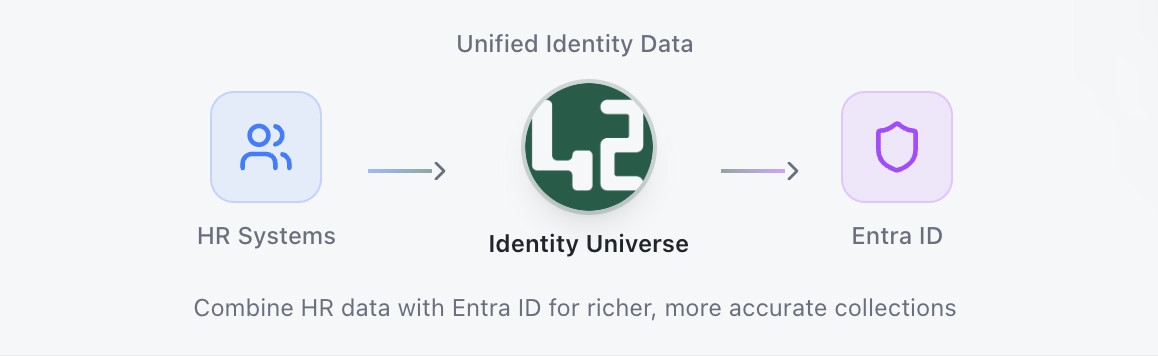
CheckID, when combined with Entra ID, occupies a different role. It does not compete with Entra’s control plane. Instead, it strengthens Entra ID at the exact moments where user journeys otherwise break down. A new hire, a contractor, or an employee with a lost device verifies with a national eID. CheckID then issues a TAP in Entra ID. The person signs in, enrolls Authenticator and a passkey, and is aligned with Conditional Access policies from the first session. Temporary passwords are eliminated.
​​A simple comparison table makes the differences clear:
​
Feature | Entra ID | Okta/Ping/Duo | CheckID + EntraID |
|---|---|---|---|
Compliance recognition | Strong | Strong | Adds regulator-recognized eIDs |
Integration | Strong in Microsoft stack | Wide app coverage | Native to Entra ID |
Device setup | TAP + Intune | Supported but complex | eID Verification + TAP |
Account Recovery | TAP | Varies | Verified account recovery with eID |
Password-free onboarding | Not native | Varies | eID + TAP Workflow |
National eID support (BankID, MitID, etc.) | Yes, via TAP | Limited/Varies | Built-In |
When comparing these options, features alone do not tell the full story. Adoption depends on whether employees trust and understand the method provided. In markets where national eIDs are near-universal, extending them into the workplace is both natural and efficient.
Secure Access Management Design
Designing secure access management is not about stacking new authentication factors onto old processes. It is about creating end-to-end flows that resist phishing, minimize friction, and leave behind auditable evidence.
​
Onboarding without passwords
Onboarding is a prime example. In many organizations, the first day still begins with IT issuing a temporary password by email or SMS. This is both insecure and inefficient. Best practice is to replace that step with a high-assurance identity check—via an eID in the Nordics or a passkey elsewhere. From there, a TAP can be generated, giving the person immediate access to enroll permanent factors. The result is a first login that is secure, compliant, and fast.
​
Verified recovery
Recovery flows are another weak point. Attackers often exploit forgotten-password processes, intercepting email or SMS codes to gain entry. A secure recovery process begins not with shared secrets but with a verified identity proof. In the Nordics, national eIDs provide that assurance. In other contexts, FIDO2 passkeys or biometrics may serve the same role. Either way, the principle is the same: recovery must be as strong as initial onboarding.
​
Device setup that works
Device setup is a third pressure point. Laptops and phones are lost, stolen, or replaced constantly. Without a resilient process, downtime stretches into days as IT schedules re-enrollments. Best practice is to allow the employee to self-verify and set up the new device through the same eID and TAP workflow. Productivity continues almost without interruption, and IT’s role is reduced to oversight rather than direct intervention.
​
Integration, not silos
Finally, integration matters. Password-free methods should extend the central IAM platform, not exist as silos. All identity events must be logged in the same system for policy enforcement and audits. Standalone tools create fragmentation and confusion.
​
Auditability and compliance
Regulators and auditors require clear evidence of who accessed what, when, and how. Choose methods that generate verifiable logs and are recognized by regulators as high-assurance. In the Nordics, BankID, MitID, and Swedish BankID meet these criteria.
​
​
​
​

Nordic Reality:
The Role of National eIDs
In the Nordic countries, national eIDs are not niche technologies. They are the default way citizens prove their identity online.
​
In Norway, BankID covers almost the entire adult population, while ID-porten enables millions of logins to government services.
​
In Sweden, over eight million people use BankID to access everything from banks to healthcare providers.
​
In Denmark, MitID is mandatory for digital banking and public services.
​
Finland’s Trust Network aggregates multiple regulated identity methods under a unified framework.
​
These systems are not only widely used but also regulated, audited, and embedded into the national critical infrastructure. Employees already trust them for banking, healthcare, taxes, and payments. Extending them into workplace onboarding and recovery is simply an extension of what people already do daily.
​
For auditors, the value is clear as well. National eIDs are recognized as high-assurance proofs. Logs showing that an employee verified with BankID or MitID carry weight in compliance reviews in a way that email resets never could.
​
Risks, Trade-offs, And Decision Points
Every platform carries trade-offs. Entra ID alone is powerful, but if onboarding and recovery flows are not redesigned, IT tickets will remain high.
Okta and Ping bring broad app coverage but lack native Nordic eID integration. Cisco Duo adds device trust, but is not a full IAM. Building custom eID integrations in-house is possible, but regulators regularly update their requirements, making such projects costly to maintain.
​
Vendor lock-in is another consideration. Many organizations balance this by adopting FIDO2 passkeys as the long-term factor while using national eIDs as the verification step. This hybrid ensures both portability and regulatory assurance.
​
Cost calculations should not focus solely on licensing fees. Helpdesk time, employee downtime, breach risk, and compliance preparation all add to the total cost of ownership. Password-free identity pays back in hours saved, tickets avoided, and risks reduced.
Implementation with
Entra ID + CheckID
​
A practical implementation follows a clear path. You begin by defining your Entra ID policies, enabling passkeys, Authenticator, and Conditional Access. TAP is configured to be short-lived and single-use, ensuring that bootstrap events are secure.
​
CheckID is then integrated with the tenant and connected to national eID providers. This step adds the high-assurance verification that ensures the next stages are secure.
​
When a new employee is onboarded, the process is straightforward. They authenticate with BankID, ID-porten, Vipps, MitID, or Swedish BankID. CheckID verifies the identity and issues a TAP in Entra ID. The employee signs in, enrolls Authenticator and a passkey, and is compliant with Conditional Access rules from the first session.
​
The same flow applies for recovery or device setup. An employee who has lost a phone or replaced a laptop does not need to call IT. They verify with their eID, receive a new TAP, and re-enroll. Downtime is measured in minutes, not days.
Because employees already know how to use their eIDs, training requirements are minimal.
​
Frequently Asked Questions
How can migration happen without disruption?
Use TAP as the bridge. Verify with CheckID, issue TAP, and enroll Authenticator and passkeys. Run password and password-free side by side until adoption reaches critical mass.
​
What if some users lack a national eID?
Fallback methods can be configured, such as passkeys or biometric verification, but should be planned as exceptions.
​
What happens during an eID outage?
Existing enrolled factors such as Authenticator and passkeys remain valid. Outages only affect the verification step, not ongoing sign-ins.
​
How quickly can deployment happen?
Entra’s features are built in. CheckID is delivered as SaaS and listed in Microsoft marketplaces. Deployment timelines are measured in days, not months.

Next Step:
Why CTO's Choose CheckID
The direction is clear: passwords cannot remain at the heart of enterprise access management. The real question is how to replace them in a way that works for both people and auditors.
​
Microsoft Entra ID provides the policy engine, password-free sign-in methods, and Conditional Access needed to secure the environment. CheckID ensures that onboarding, recovery, and device setup are executed without temporary credentials, using identity proofs that employees already trust and regulators already recognize.
​
Together, they create an approach that is phishing-resistant, regulator-approved, and practical to adopt.​​​​


Get the latest news about CheckID